Base Scenario
When starting a new PTV Vistro project, the network you build will be your Base Scenario. Once you have a Base Scenario, you can define additional scenarios such as Weekday AM Peak and Weekday PM Peak.
The Base Scenario is the foundation for all other Scenarios. Therefore, any changes made to the Base Scenario are perpetuated through all other Scenarios. This allows you to go back and make network, volume, or traffic control changes and apply them to all scenarios created.
Objects like intersections or zones are identified by their ID. If any two objects A and A' have the same ID in the base scenario as in another scenario (Scenario X), objects A and A' will be treated as the same object. This means that if the ID is changed either in the base scenario or in Scenario X (but not both), A and A' will no longer be identified.
Intersections are connected by links. Those links have internal IDs. Deleting a link between intersections and adding a new link between those intersections assigns a new ID to the new link.
Turns are identified with an ID consisting of two parts:
- the ID of the upstream link
- the ID of the downstream link
Examples
Example 1
Turn T on Intersection 1 has volume 10 veh/h in the base scenario and 20 veh/h in Scenario X. Now Intersection 1 is renamed to 2 in the base scenario. PTV Vistro no longer identifies this intersection with Intersection 1 of Scenario X. When Scenario X now is opened, it contains Intersection 2 as it is in the base scenario. Since the base scenario does not contain Intersection 1 any longer, data concerning Intersection 1 in Scenario X will be ignored. Therefore, Turn T no longer has volume 20 veh/h in Scenario X.
Example 2
The link between two intersections is deleted. Then it is recreated by connecting the leg handles that appeared when the link was deleted (see section Connect your intersections). The new link will have a new internal ID and will not be identified with the previous link. Scenario data that is connected to that previous link is no longer viable. This means that scenarios will be changed by such an operation.
Example 3
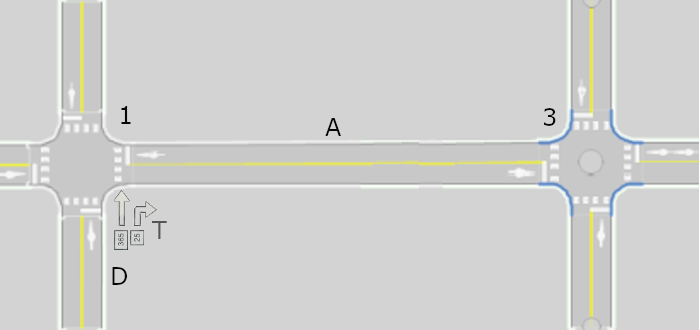
Link A connects Intersections 1 and 3. There are also turns on the intersections, e.g. Turn T go from Link D to Link A:
A new Intersection 2 is added on link A. There are now two new links, replacing link A:
- Link B going from Intersection 1 to 2
- Link C going from Intersection 2 to 3
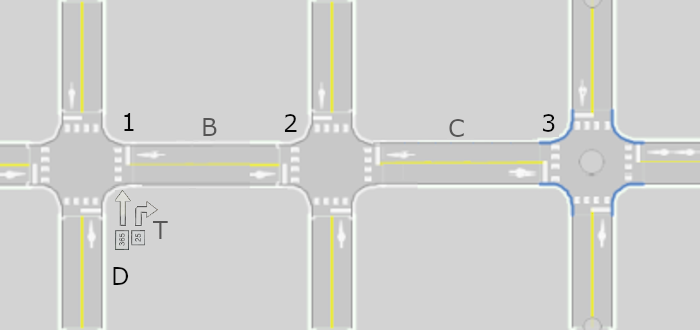
Link D is not affected by the change.
Scenarios may contain data for Turn T. But T no longer exists in the base network. It was replaced by Turn T’ going from Link D to Link B, because Link B replaced Link A on Intersection 1. This means that when a scenario is opened, the data for Turn T will no longer be applied, because it is not identified with Turn T’.
- ► As a consequence, look at Intersections 1 and 3 in all scenarios and update the data.