Trip Distribution
Trip distribution inputs are entered in the Trip Distribution Workflow Task Table. The percentages of trips from each Gate and/or Zone in the network to the Zone of interest are entered to reflect the trip distribution of inbound trips, see the Trip Distribution Table below. Similarly, the percentages of trips from the Zone of interest to each Gate and/or Zone in the network are entered to reflect the trip distribution of outbound trips.
Figure 25: Trip Distribution Table
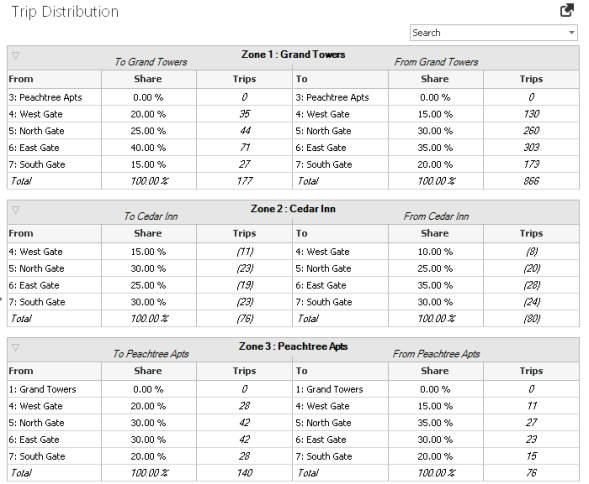
The table for each zone can be collapsed or expanded, to allow for ease of viewing, by clicking the triangle shape on the left-side of the table header bar for each zone.
The search entry box can be utilized to search for a specific zone in the network.
The trip distribution percentages are utilized, along with the trip generation data entered in the Trip Generation Workflow Task Table (see section Trip Generation) and the Path percentages entered in Trip Assignment Workflow Task Table (see section Trip Assignment)), to determine the traffic assignments on the network.
Trip Distribution parameters are described in the table below.
Table 26: Trip Distribution Parameters
| Parameter | Description |
|---|---|
|
Zone #: Name |
Reference Zone # and Name for sub-table |
|
To Zone Name |
Trips entering the Zone from other Zones and Gates |
|
From |
Zone or Gate trips come from (to enter subject Zone) |
|
From Share, % |
Percent Share of trips for subject Zone that are distributed to each Zone or Gate |
|
From Trips |
Total number of trips for the subject Zone that are distributed to each Zone or Gate, based on the From Share % |
|
From Zone Name |
Trips exiting the Zone to go to other Zones and Gates |
|
To |
Zone or Gate trips travel to |
|
To Share, % |
Percent Share of trips from each Zone and Gate distributed to the subject Zone |
|
To Trips |
Total number of trips for each Zone and Gate distributed to the subject Zone, based on the From Share % |

|
Note: Due to data consistency, changing a share % for one Zone may change the share % for another Zone as the number of trips from one zone to another zone may not be represented as the same Share % for each of those zones. |
PTV Vistro also provides additional functions to assist with data entry. These are described below:
Table 27: Trip Distribution Functions
| Function | Description |
|---|---|
|
Zone and Gate Name |
Enter a Zone / Gate name in the table. The Zone number and name will be shown. |
|
Search Zone |
Window with drop-down list of all Zones in the network. Selecting a Zone in this search window will collapse all other tables in view. To search, select the down arrow to see the entire list. You can also type in the Zone number or name directly. This search is case sensitive. |
|
Mirror Distribution |
If you have the same distribution for trips entering the Zone as leaving the Zone, you can input the share % for either the To or From and mirror that distribution for the other direction by using the left and right arrows in the header of each sub-table. |
|
Column Filter |
Use the filter for the Share % or Trips to view only specific values (e.g., only show values greater than 0 %). |

