HCM for Signalized Intersections
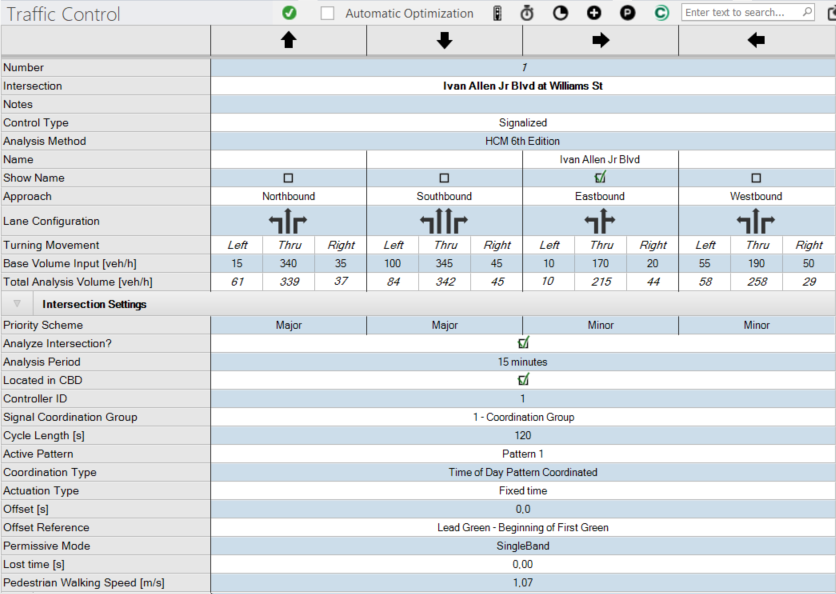
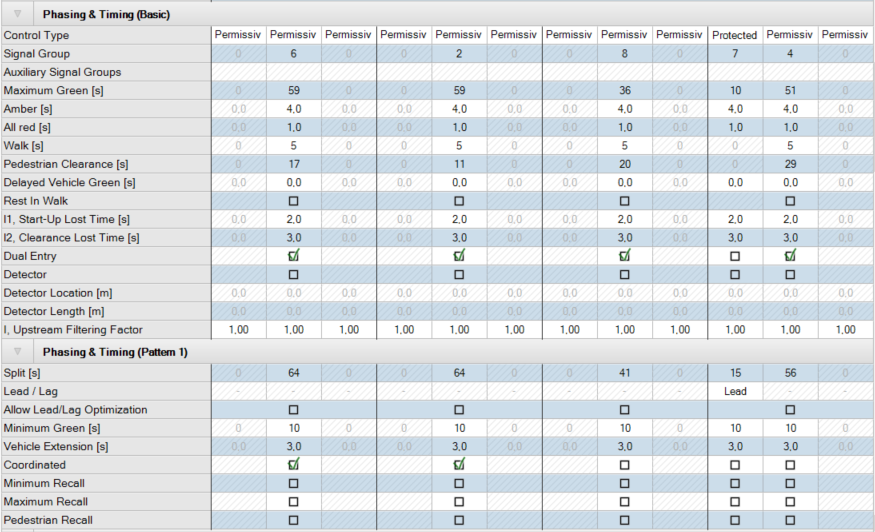
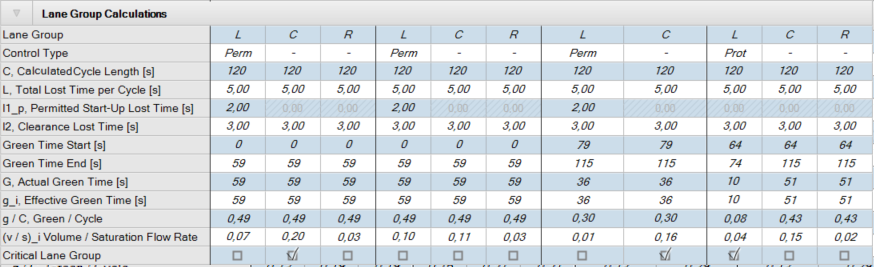
The Traffic Control table for the HCM 7th Edition, HCM 6th Edition, HCM 2010 and HCM 2000 methods for signals is shown in the figure of the table below.
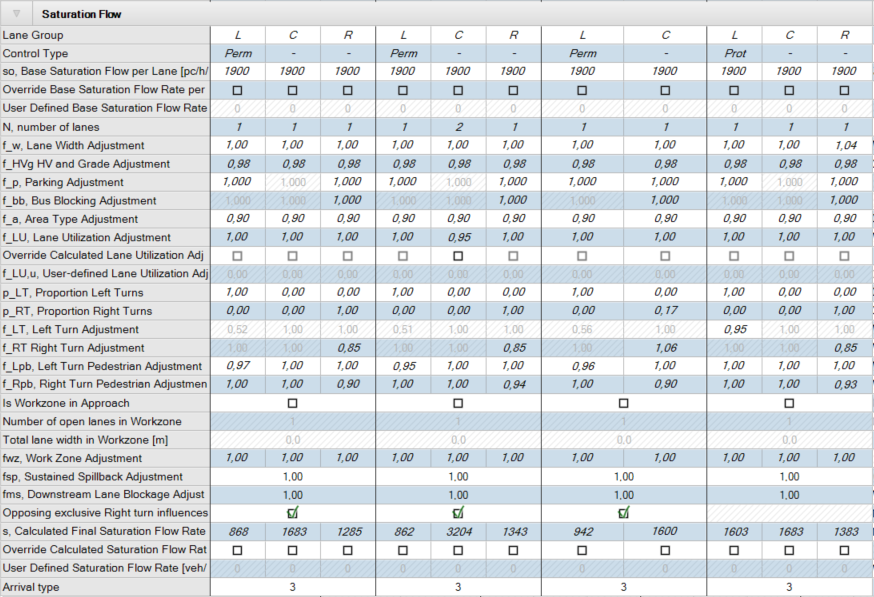
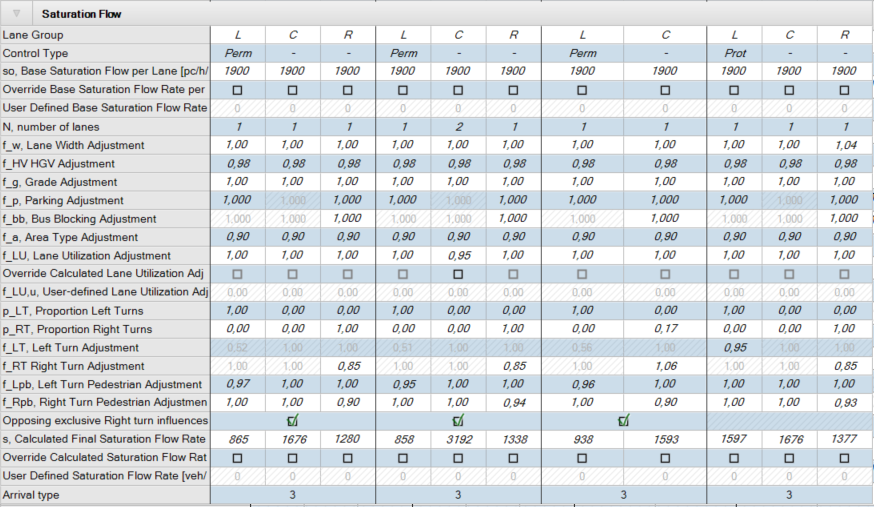
The Saturation Flow sub-table varies for the HCM 7th Edition, HCM 6th Edition and the HCM 2010 and HCM 2000, therefore each are shown as noted. Additionally, PTV Vistro also includes analysis results for pedestrians and bicycles using the HCM 6th Edition methods, shown in the Other Modes sub-table.
Table definitions are presented in the table Traffic Control Parameters: HCM for Signalized Intersections (see section Traffic Control Parameters: HCM for Signalized Intersections - Intersection Settings) below the figures. Common parameters are described in a separate chapter (see section Common Parameters and Unknown Control Type).
From the Traffic Control Table you can export the signal controllers of the current intersection to Econolite Centracs® as a *.csv file via the button  Centracs Export.
Figure 10: Traffic Control Table: HCM for Signalized Intersections

HCM 7th Edition Saturation Flow Sub-table:
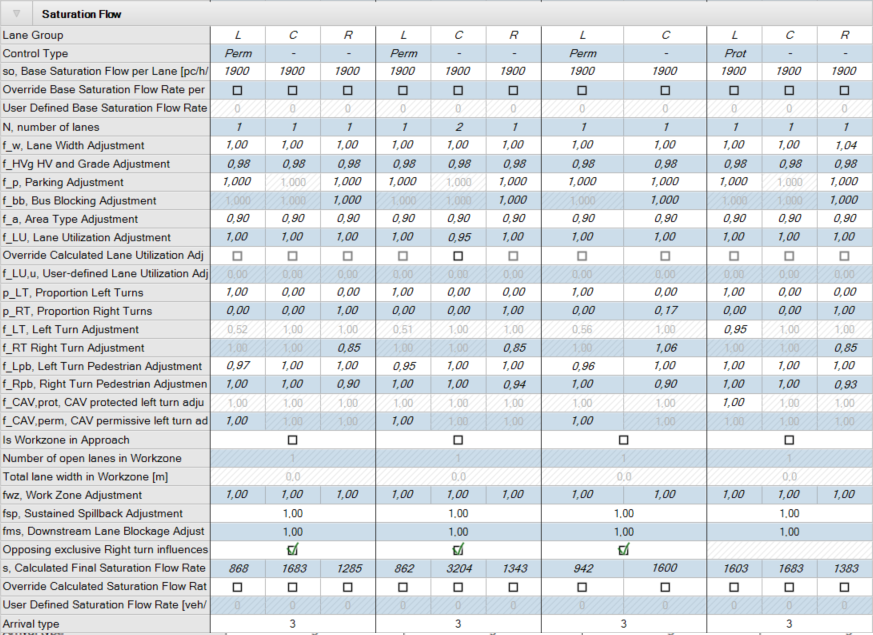
HCM 6th Edition Saturation Flow Sub-table:
HCM 2010 and HCM 2000 Saturation Flow Sub-table:

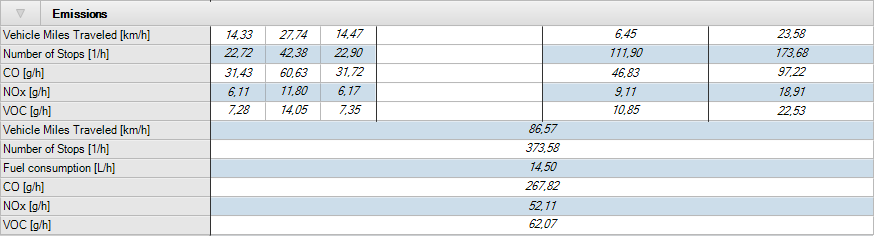
HCM 6th Edition Other Modes Sub-table:
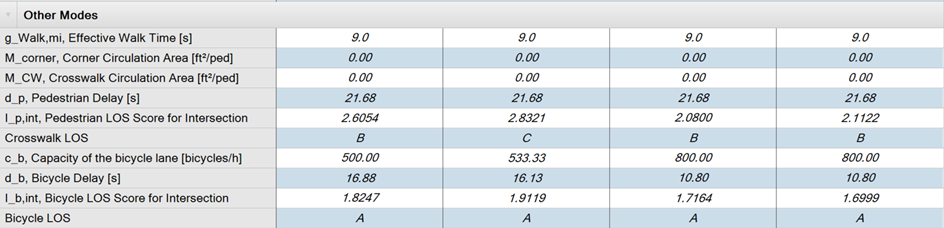
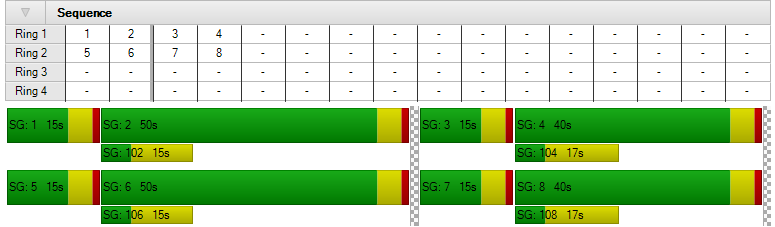
Table 6: Traffic Control Functions and Features
| Function | Description | |
|---|---|---|
|
|
Automatic Optimization |
A single intersection can be automatically optimized, by selecting the toggle Automatic Optimization (see section Automatic Local Optimization for a Single Intersection) |
|
|
Create Default Signalization |
Set signal group numbers and create sequence. Optimize Cycle Time, Maximum Green and Splits if there is no signalization yet, optimize splits if there already was signalization. |
|
|
Optimize Splits and Cycle Time |
Optimizes local splits and cycle time for current selected intersection |
|
|
Optimize Split |
Optimizes local splits only (maintains cycle time) for current selected intersection |
|
|
Signal Groups |
Insert, Delete and Edit Signal Groups. Inserted signal groups get a correct relation between Minimum Green, Maximum Green, and Split. Default split = Minimum Green + Amber + All Red + Delayed Vehicle Green. The Maximum Green is equal to Minimum Green (see section Global Settings). |
|
|
Patterns |
Insert or delete Patterns. You can select the desired pattern for the current intersection from the Active pattern list field in the Intersection settings area. |
|
|
Centracs Export |
Export the signal controller data of the current intersection to Econolite Centracs® as a *.csv file. |



Table 7: Traffic Control Parameters: HCM for Signalized Intersections - Intersection Settings
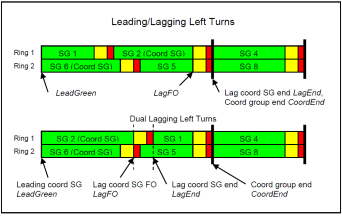
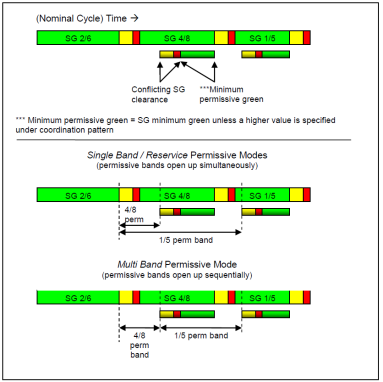
Table 8: Traffic Control Parameters: HCM for Signalized Intersections - Phasing and Timing
|
Phasing and Timing |
||||||
|---|---|---|---|---|---|---|
| Parameter | Description | Units | ||||
|
Control Type |
Defines control of movements as:
Control Type for each movement should be reviewed under the Phasing & Timing section and set to the following: Permissive (Permitted) control requires motorists to choose acceptable gaps and/or yield to conflicting vehicles or pedestrian traffic streams.
|
|
||||
|
Allow Lead/Lag Optimization |
Checkbox to allow for lead/lag optimization |
|||||
|
Signal Group |
The signal group is the signal phase number |
|
||||
|
Auxiliary Signal Groups |
All signal groups serving the movement. When the Control Type is Overlap and the Signal Group for the Overlap phase is entered, the Auxiliary Signal Groups cell is active and allows selections of any phases with which this movement overlaps.
|
|
||||
|
Lead/Lag |
Selection for Lead or Lag left turn for protected phasing |
|||||
|
Minimum Green |
Minimum green time that the signal group will serve before changing to yellow. Different default Minimum Greens can be set for left and through movements in the Global Settings |
S | ||||
|
Maximum Green |
Maximum time that the signal group will be allowed to extend before it will max-out. A max-out will make a signal group eligible to terminate, even though it may not have gapped-out. This parameter when exported to RBC is reflected as Max1. Editing the Split, Amber, All red, or Delayed Vehicle Green the Maximum Green time is automatically adapted, if the signal group satisfies the consistency conditions in all patterns. This implies that the Split is the same in all patterns. |
S |
||||
|
Amber |
Time a signal group will time an amber interval before advancing to red |
S |
||||
|
All red |
Time a signal group will time red before a conflicting signal group will be allowed to begin timing |
S |
||||
|
Split |
Amount of time allocated in the cycle for each signal group to time. The split includes the time it will take the green, yellow, and red intervals to time for each signal group. The split should at least accommodate the signal group Min Green plus Yellow Clearance plus Red Clearance time, but it does not necessarily need to accommodate the full pedestrian service time for an actuated pedestrian signal group. The sum of the splits of all signal groups in each ring should add up to the Cycle Length. |
S |
||||
|
Vehicle Extension |
Allowed time between successful vehicle extensions before a signal group will gap out. This parameter may be referred to as passage in some controllers and does not affect the capacity calculation. |
S |
||||
|
Walk |
Minimum time a signal group will display a walk indication before advancing to the pedestrian clearance interval (flashing don’t walk). A signal group may not advance to yellow while the pedestrian movement is in the walk interval. |
S |
||||
|
Pedestrian Clearance |
Time a signal group will display a flashing don’t walk indication before advancing to solid don’t walk. A signal group may not advance to Yellow while the pedestrian movement is in the pedestrian clearance interval. Pedestrian clearance is estimated based on lane withs and median widths when Create Default Signalization is clicked.
|
S |
||||
|
Delayed Vehicle Green |
Delayed Vehicle Green can be used to establish Lead Pedestrian Intervals. This value is the amount of time that the vehicle green interval is delayed before Start of Green. This value allows the pedestrian walk interval to start before vehicle green. |
|||||
|
Rest in Walk |
Rest in walk time of the pedestrian signal | |||||
|
l1, Start-Up Lost Time |
Additional time needed to react to the initiation of the green signal and then accelerate |
S |
||||
|
l2, Clearance Lost Time |
Time between signal indication changes during which the intersection is not used by vehicles |
S |
||||
|
Coordinated |
Identifies the coordinate signal groups for the signal controller |
|||||
|
Minimum Recall |
Signal groups flagged for this option will receive an automatic vehicle call regardless of actuation and time for at least its minimum green time. The green time may extend beyond the minimum if demand is present. |
|
||||
|
Maximum Recall |
Signal groups flagged for this option will receive an automatic vehicle call and extension. The maximum green timer will unconditionally begin timing at the beginning of green. Normally, the maximum green timer will only time if there are opposing calls to the signal group. |
|
||||
|
Pedestrian Recall (Pedestrian push-button) |
Signal groups flagged for this option will receive an automatic pedestrian call and time for the full walk plus pedestrian clearance time.
|
|
||||
|
Dual Entry |
When a signal group has a call in the next barrier group, concurrent phases in that barrier group may not have a call. In such case both the signal group with the call and the signal group with no call will begin timing when the barrier is crossed if both signal groups are flagged with Dual Entry. This feature is often used for through movement signal groups such that if one signal group is called, the signal group in the opposite direction will automatically serve, even if it does not have a call. |
S |
||||
|
Detector |
Checkbox to choose detector |
|
||||
|
Detector Location |
Distance upstream of stop bar of leading edge of detector |
ft / m |
||||
|
Detector Length |
Length of detector |
ft / m |
||||
|
Advanced Detector |
Checkbox to add a second detector to each movement: Choose the advanced detector |
|||||
|
Advanced Detector Location |
Distance upstream of stop bar of leading edge of advanced detector |
ft / m |
||||
|
Advanced Detector Length |
Length of advanced detector |
ft / m |
||||
|
I, Upstream Filtering Factor |
Adjustment factor to account for the effect of an upstream signal on vehicle arrivals to the subject movement group. This is currently user-defined. |
|
||||

Table 9: Traffic Control Parameters: HCM for Signalized Intersections - Phasing and Timing (Pattern 1)
|
Phasing &Timing (Pattern 1) |
||
|---|---|---|
|
When the Active Pattern is Free Running, the data rows Split, Lead/Lag, Allow Lead/Lag Optimization, and Coordinated are not editable. |
||
| Parameter | Description | Units |
Table 10: Traffic Control Parameters: HCM for Signalized Intersections - Exclusive Pedestrian Phase
|
Exclusive Pedestrian Phase |
||
|---|---|---|
| Parameter | Description | Units |
|
Pedestrian Signal Group |
The signal phase number for the exclusive pedestrian phase |
|
|
Pedestrian Walk |
Minimum time the exclusive pedestrian signal group will display a walk indication before advancing to the pedestrian clearance interval (flashing don’t walk). A signal group may not advance to yellow while the pedestrian movement is in the walk interval. |
S |
|
Pedestrian Clearance |
Time the exclusive pedestrian signal group will display a flashing don’t walk indication before advancing to solid don’t walk. A signal group may not advance to Yellow while the pedestrian movement is in the pedestrian clearance interval. |
S |
Table 11: Traffic Control Parameters: HCM for Signalized Intersections - Lane Group Calculations
|
Lane Group Calculations |
||
|---|---|---|
| Parameter | Description | Units |
|
Lane Group |
Lane or group of lanes designated for analysis |
|
|
Control Type |
Defines control of movements as:
|
|
|
C, Cycle Length |
Controller cycle length. This is the maximum time it will take for each signal group to cycle once. The cycle length is only used for coordination. |
s |
|
L, Total Loss Time per Cycle |
Total lost time per cycle for specified lane group |
s |
|
l1, Start Up Loss Time |
Time consumed to react and begin acceleration after signal group initiates green. Default = 2.0 s |
s |
|
l2, Clearance Loss Time |
Time consumed at the end of a signal group not serving traffic due to drivers decelerating and stopping in reaction to an amber indication. Default = 3.0 s |
s |
|
Green Time Start |
Start of the signal group green time in the local cycle |
s |
|
Green Time End |
End of the signal group green time in the local cycle |
s |
|
G, Actual Green Time |
Displayed green time per cycle |
s |
|
g_i, Effective Green Time |
Amount of green time where vehicles proceed at the saturation flow rate |
s |
|
g/C, Green / Cycle |
The ratio of the effective green time of a signal group to the cycle length |
s |
|
(v/s)_i, Volume / Saturation Flow Rate |
The ratio of the volume to the saturation flow rate for the specified lane group |
veh/h |
|
Critical Lane Group |
Lane groups with the highest flow rate are indicated as critical |
|
Table 12: Traffic Control Parameters: HCM for Signalized Intersections - Saturation Flow Calculations
|
Saturation Flow Calculations |
||
|---|---|---|
| Parameter | Description | Units |
|
Lane Group |
Lane or group of lanes designated for analysis |
|
|
Control Type |
Defines control of movements as:
|
|
|
so, Base Saturation Flow Rate |
Saturation flow rate for base (ideal) conditions Default = 1900 veh/h/ln |
pc/h/ln |
|
Override Base Saturation Flow Rate per lane |
Checkbox to activate user input for Base Saturation Flow Rate |
|
| User Defined Base Saturation Flow Rate per lane | User-defined Base Saturation Flow Rate. When this is defined, this value will be used in place of the Base Saturation Flow Rate | pc/h/ln |
|
N, Number of Lanes |
Number of lanes in the lane group |
|
|
f_w, Lane Width Adjustment |
Factor for lane width adjustment |
|
|
f_HV, HGV Adjustment |
Adjustment factor for heavy vehicles |
|
|
f_g, Grade Adjustment |
Adjustment factor for the approach grade |
|
|
f_HVg, HV and Grade Adjustment |
Adjustment factor for heavy vehicles and grade (HCM since 6th Edition) |
|
|
f_p, Parking Adjustment |
Adjustment factor for parking operations adjacent to travel lane |
|
|
f_bb, Bus Blocking Adjustment |
Adjustment factor for bus periodically blocking travel lane at transit stop |
|
|
f_a, Area Type Adjustment |
Adjustment factor for CBD designation |
|
|
f_LU, Lane Utilization Adjustment |
Adjustment factor for non-balanced lane utilization |
|
|
Override Calculated Lane Utilization Adj |
Checkbox to activate user input for Lane Utilization Adjustment Factor |
|
|
f_LU,u, User-defined Lane Utilization Adjustment |
User-defined Lane Utilization Adjustment Factor. When this is defined, this value will be used in place of the calculated f_LU. |
|
|
p_LT, Proportion Left Turns |
Proportion of left-turning vehicles in the lane |
% |
|
p_RT, Proportion Right Turns |
Proportion of right-turning vehicles in the lane |
% |
|
f_LT, Left Turn Adjustment |
Adjustment factor to reflect left-turn geometry |
|
|
f_RT, Right Turn Adjustment |
Adjustment factor to reflect right-turn geometry |
|
|
f_Lpb, Left Turn Pedestrian Adjustment |
Pedestrian adjustment factor for left-turn groups |
|
|
f_Rpb, Right Turn Pedestrian Adjustment |
Pedestrian adjustment factor for right-turn groups |
|
|
f_CAV, prot |
CAV protected left turn adjustment. Only relevant for lane groups, that have an inner turn and if the respective phase exists in the signal timing, (HCM 7th Edition) |
|
|
f_CAV, perm |
CAV permissive left turn adjustment. Only relevant for lane groups, that have an inner turn and if the respective phase exists in the signal timing, (HCM 7th Edition) |
|
|
Is Workzone in Approach |
Checkbox to activate if a workzone is present on the approach (HCM since 6th Edition) |
|
|
Number of open lanes in Workzone |
Number of open lanes in the workzone (HCM since 6th Edition) |
|
|
Total lane width in Workzone |
Total width of all open lanes on the approach in the workzone (HCM since 6th Edition) |
ft / m |
|
fwz, Work Zone Adjustment |
Adjustment factor for work zone presence (HCM since 6th Edition) |
|
|
fsp, Sustained Spillback Adjustment |
Adjustment factor for effect of spillback from the downstream intersection (HCM since 6th Edition) |
|
|
fms, Downstream Lane Blockage Adjustment |
Adjustment factor for downstream lane closure (HCM since 6th Edition) |
|
|
s, Calculated Final Saturation Flow Rate |
Calculated final saturation flow rate after all adjustments has been taken into account. |
veh/h/ln |
|
Override Calculated Saturation Flow Rate |
Checkbox to activate user input for Saturation Flow Rate |
|
|
User-Defined Saturation Flow Rate |
User-defined Saturation Flow Rate. When this is defined, this value will be used in place of the Calculated Final Saturation Flow Rate. |
veh/h/ln |
|
Arrival Type |
The arrival type selects the Platoon Ratio which describes the level of platooning quality arriving at the selected approach. The platoon ratio will be automatically updated based on the selection of Arrival Type per approach. Default = 3. Range = 1 – 6 (very poor – exceptional coordination): 1 Very Poor Progression 2 Unfavorable Progression 3 Random Arrivals or Uncoordinated (default) 4 Favorable Progression 5 Highly Favorable Progression 6 Exceptionally Favorable Progression The Arrival Type should be updated to match the field or desired conditions. See the HCM for further guidance on selection of the Arrival Type and Platoon Ratio. |
|
Table 13: Traffic Control Parameters: HCM for Signalized Intersections - Capacity Analysis
|
Capacity Analysis |
||
|---|---|---|
| Parameter | Description | Units |
|
Lane Group |
Lane or group of lanes designated for analysis |
|
|
Control Type |
Defines control of movements as:
|
|
|
V, Volume |
Lane group volume (total analysis volume) |
veh/h |
|
s, Saturation Flow Rate |
Final saturated flow rate (calculated or user-defined) |
veh/h |
|
c, Capacity |
Effective capacity, taking into account all opposing flows etc. |
veh/h |
|
g/C, Green / Cycle |
The ratio of the effective green time of a signal group to the cycle length |
|
|
X, Volume / Capacity |
The ratio of the total analysis volume (flow rate) to the capacity |
|
|
d1, Uniform Delay |
The first term of the equation for lane group control delay, assuming constant arrival and departure rates during a given time period. |
s |
|
k, incremental delay calibration factor |
Incremental delay factor used to account for the effect of controller type on delay. Default = 0.50 |
|
|
d2, Incremental Delay, |
The second term of lane group control delay, accounting for delay due to the effect of random, cycle-by-cycle fluctuations in demand that occasionally exceed capacity (i.e., cycle failure) and delay due to sustained oversaturation during the analysis period. |
s |
|
d3, Initial Queue Delay |
The third term of lane group control delay, accounting for delay due to a residual queue identified in a previous analysis period and persisting at the start of the current analysis period. This delay results from the additional time required to clear the initial queue. |
s |
|
Rp, Platoon Ratio |
Describes the quality of signal progression for the corresponding movement group. Values based on HCM look-up table for arrival type. |
|
|
P, Proportion Arriving on Green |
Proportion of vehicles arriving during the green indication |
% |
|
PF, Progression Factor |
Delay adjustment factor based on the progression quality |
|
Table 14: Traffic Control Parameters: HCM for Signalized Intersections - Lane Group Results
|
Lane Group Results |
||
|---|---|---|
| Parameter | Description | Units |
|
X, Volume/Capacity for Lane Group |
The ratio of the total analysis volume (flow rate) to the capacity |
|
|
d, Delay for Lane Group |
Control delay for lane group |
s/veh |
|
Lane Group LOS |
Level-of-service for lane group |
|
|
Critical Lane Group |
Lane groups with the highest flow rate are indicated as critical. |
|
|
50th-Percentile Queue Length |
50th percentile queue length measured in number of vehicles per lane |
veh |
|
50th-Percentile Queue Length |
50th percentile queue length measured in feet per lane |
ft |
|
95th-Percentile Queue Length |
95th percentile queue length measured in number of vehicles per lane |
veh |
|
95th-Percentile Queue Length |
95th percentile queue length measured in feet per lane |
ft |
Table 15: Traffic Control Parameters: HCM for Signalized Intersections - Movement, Approach, & Intersection Results
|
Movement, Approach, & Intersection Results |
||
|---|---|---|
| Parameter | Description | Units |
|
d_M, Delay for Movement |
Control delay per movement |
s/veh |
|
Movement LOS |
Level-of-service for movement |
|
|
Critical Movement |
|
|
|
d_A, Approach Delay |
Average control delay by approach |
s/veh |
|
Approach LOS |
Level-of-service for approach |
|
|
d_I, Intersection Delay |
Average control delay for intersection |
s/veh |
|
Intersection LOS |
Level-of-service for intersection |
|
|
Intersection V/C |
Volume-to-capacity ratio for the intersection |
|
Table 16: Traffic Control Parameters: HCM for Signalized Intersections - Other Modes (HCM 6thand 7th Edition)
|
Other Modes (HCM 6thand 7th Edition) |
||
|---|---|---|
| Parameter | Description | Units |
|
g_Walk,mi, Effective Walk Time |
Effective walk time for the phase serving the minor street movement |
s |
|
M_corner, Corner Circulation Area |
Corner circulation area per pedestrian. The subject corner is the near-side corner on the subject approach on the side of the direction of travel (e.g., right side for right-hand traffic, left side for left-hand traffic). |
ft2/ped m2/ped |
|
M_CW, Crosswalk Circulation Area |
Crosswalk circulation area per pedestrian |
ft2/ped m2/ped |
|
d_p, Pedestrian Delay |
Pedestrian delay while waiting to cross the street |
|
|
I_p,int, Pedestrian LOS Score for Intersection |
Pedestrian LOS score |
|
|
Crosswalk LOS |
Pedestrian LOS based on pedestrian LOS score |
|
|
c_b, Capacity of the bicycle lane |
Capacity of the bicycle lane |
|
|
d_b, Bicycle Delay |
Bicycle delay |
|
|
I_b,int, Bicycle LOS Score for Intersection |
Bicycle LOS score |
|
|
Bicycle LOS |
Bicycle LOS based on bicycle LOS score |
|
Table 17: Traffic Control Parameters: HCM for Signalized Intersections - Sequence Editor
|
Sequence Editor |
||
|---|---|---|
| Parameter | Description | Units |
|
Ring 1 |
User defines the Signal Groups that occur on Ring 1 |
|
|
Ring 2 |
User defines the Signal Groups that occur on Ring 2, if applicable |
|
|
Ring 3 |
User defines the Signal Groups that occur on Ring 3, if applicable |
|
|
Ring 4 |
User defines the Signal Groups that occur on Ring 4, if applicable |
|

