Local Optimization for All Intersections
To optimize all intersections in the network using the Local Optimization:
1. Go to the Signal Control > Local Optimization in the Menu Bar to access the Local Optimization Splits dialog for all intersections:
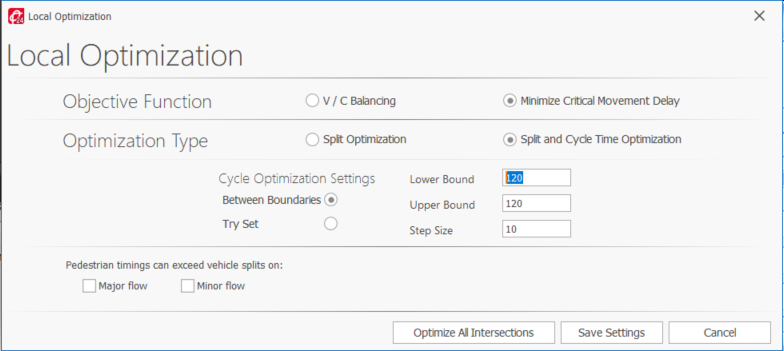
2. Select the desired Objective Function.
3. Define the Cycle Optimization Settings.
4. Optionally select that Pedestrian timing can exceed vehicle splits:
-
Major flow: affects all signal groups set on major flow.
-
Minor flow: affects all signal groups on minor flows.
These settings allow optimizing splits without forcing pedestrian signals (walk plus pedestrian clearance) to be shorter than or equal to vehicle signals (delayed vehicle green plus split minus amber minus all-red). The controllers can retain a long pedestrian phase and a shorter vehicle phase on approaches with low pedestrian volumes and longer crossing lengths. This functionality reflects the approach taken by signals in the field to temporarily operate out of coordination to serve this condition
5. Click Save Settings to save the settings without optimizing or Optimize All Intersections to complete the local optimization for all intersections.
You can then view the results in the time-space diagram under the Optimization Workflow.