PTV Vistro enables an update import or export of active base models or scenario data. This procedure can be used to transfer specific data from one base scenario/scenario to another networks existing data. Using this feature is extremely useful when wishing to blend specific networks together, such as networks containing different peak-period information or configurations in separate files but with similar intersection ID.
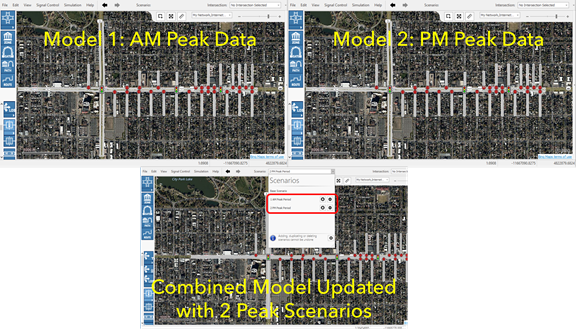
For example: with this feature if you have 2 separate AM and PM peak period Vistro files of the same network you could combine the models together by simply copying the AM scenario in the AM file, rename this copied scenario PM, then update this scenario with a PM Update Datafile form the second PM Vistro model.
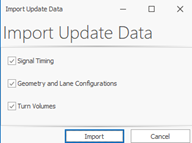
The settings 'Signal Timing', 'Geometry and Lane Configurations' and 'Turn Volumes' can be used to determine, which type of data should be updated.
To Update data:
First, determine which Vistro base scenario/scenario is the “target model” to receive the Update Data file and then decide which base scenario/scenario has the data you wish to Update. Is it possible that you may want to create a new scenario in the “target model” to receive updates.
1. In the Vistro base scenario or scenario that contains the data you wish to Update go to File > Export > Update Data, then save the .vistroupdate data file.
2. In the Vistro base scenario/scenario that is the “target model” go to File > Import > Update Data. The Import Update Data dialogue will appear.
Select 1 or more data types to import. This data type will override existing parameters at intersection with the same Intersection Number.
Click Import.
3. Next, select a .vistroupdate data file to update the existing intersection data.
After clicking okay, the models will be Update in the “target model” if they share the same Intersection IDs.
