To utilize the Network Optimization, intersections to be optimized must have the following:
- Signal timing data inputs, including signal group designations and sequence)
- "Coordination Type = Coordinated"
In addition, you must also:
- Define Coordination Groups; and
- Define Routes and assign Weights to them.
These are described in the subsection below. Once this is set up, you can then set up and run the Network Optimization by following these steps:
- Go to the Signal Control > Network Optimization in the Menu Bar to access the Network Optimization Dialog:
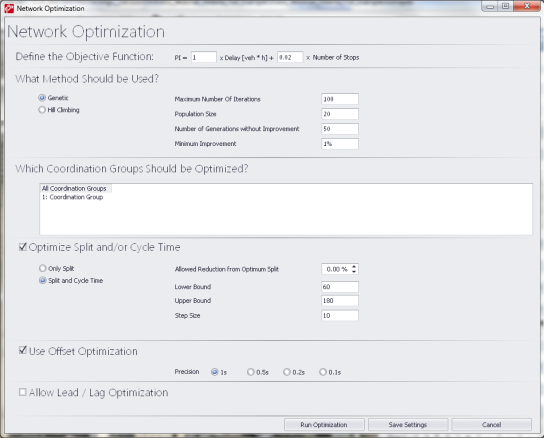
- Select Parameters to be optimized.
- Select Coordination Sub Groups to be optimized.
- Select and parameterize Optimization Method.
- Click on Run Optimization.
You can then view the results in the time-space diagram under the Optimization Workflow.
