Modeling connectors
In order for vehicles to continue their journey on the following links, you must connect these links with connectors. This also allows you to model turn relations at intersections.
Connectors can only be inserted between two links. You cannot connect connectors to each other.
Connectors for lane widening and narrowing
You can define connectors for lane widening and narrowing along which the number of lanes changes (Defining connectors):
Connectors for lane widening
- Lane addition: Connector that adds another lane along its course. The connector may also expand from ZERO lanes to one lane.
- Lane distribution: Connector that adds several lanes along its course. The connector cannot expand from ZERO lanes to multiple lanes.
Connectors for lane narrowing
- Lane removal: A connector that reduces the number of lanes along its course. The connector cannot narrow from one lane to ZERO lanes.
- Lane merging: Connector that reduces the number of lanes along its course. The connector cannot narrow from multiple lanes to ZERO lanes.
Example: Modeling connectors for lane widening and narrowing
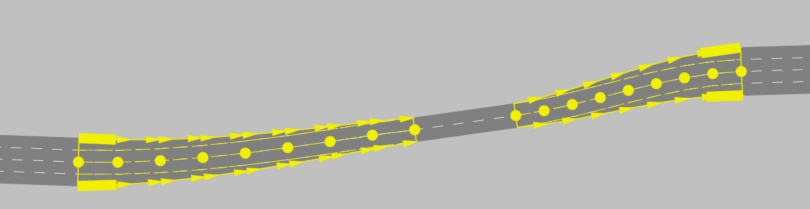
To create a narrowing, you model a lane merge by connecting a link with four lanes to a link with two lanes. Further along the link, you model a widening by dividing the link from two lanes to four lanes again. Modeling allows lanes to be located either on the far right or far left that have no from-link in the case of a lane distribution or no to-link in the case of a narrowing. This is also shown by the visualization of the connector in the network editor: When lanes are split, lanes are added along the connector, while when lanes are merged, lanes disappear until the end of the connector.
Connectors for inside merges
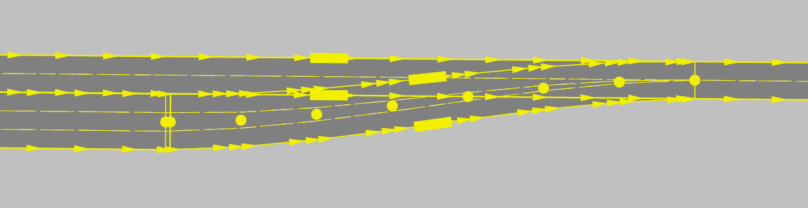
You can also model inside merges, for example, to merge lanes downstream of toll stations. Modeling allows one or several lanes to be located between the outer lanes, if they have not to-links. Lanes that start between the outer lanes disappear until the end point of the connector.
Further properties of links
Lanes cannot cross each other in connectors.
When using vehicle routes, make sure that through traffic follows vehicle routes that extend beyond the connector onto the lanes of the corresponding link. This applies in particular to lane removals and lane mergers.
Connectors have attributes and options which are largely comparable to those of links (Attributes of connectors), (Attributes of links).
You may move the start or end point of a connector to a different link later on.
Vissim automatically inserts connectors when you create a car park (Creating a car park).
Connectors: Videos and example
Video: New Connector Features Part 1 (Basics)
Video: New Connector Features Part 2 (Advanced)
|
Note: Full-screen playback of the video is only available in Google Chrome and Microsoft Edge. To view in other browsers, click on the title of the video in the preview. |

|
|
Tips: You will find sample data and a description in your Vissim installation: ..\Examples Training\Merging & Weaving |

Superordinate topic:
Information on editing:
Related topics: