Using signal controller type Fixed time (simple)
The signal controller type Fixed Time (simple) allows you to define simple fixed time signal controllers without the Vissig add-on. Signal groups and supply data are stored as attributes of the signal controller. Attributes of the signal controller and its signal groups can be changed during the simulation.
1. On the Signal Control menu, click > Signal Controllers.
The Signal Controllers list opens.
2. Right-click the entry of your choice.
3. On the shortcut menu, click Edit.
The Signal Controller window opens.
4. In the Type box, select > Fixed Time (simple).
5. Open the Signal groups tab.
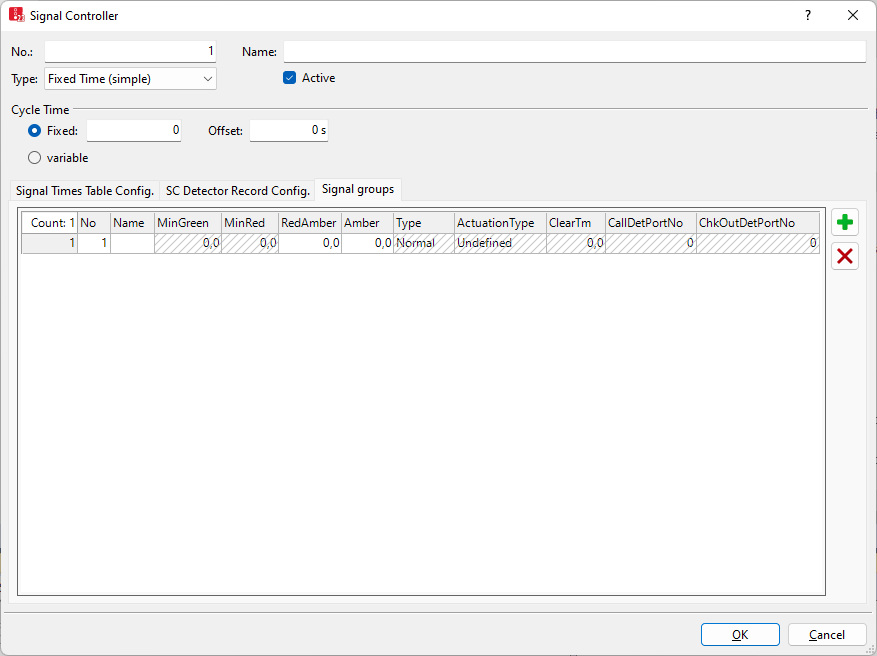
6. Make the desired changes:
| Element | Description |
|---|---|
|
RedAmber |
Red-amber time:Duration of the RedAmber interval within one cycle. |
|
Amber |
Amber: Duration of the amber interval within one cycle. |
Signal controllers have additional attributes that you can show in the Signal Controllers attributes list and in the linked lists of relations.
Editing further attributes in the Signal Controllers list or linked list of a relation
The driving behavior has additional attributes that you can show in the Signal Controllers attributes list The network objects may have relations to other objects. This is why the attributes list is shown as part of a coupled list (on the left). On the Lists toolbar, in the Relations box, you can show and edit the coupled list with the attributes of the desired relation on the right (Using lists), (Using coupled lists).

|
Notes:
|

1. On the Signal Control menu, click > Signal Controllers.
The Signal Controllers list opens.
1. In the list on the left, click the desired entry.
2. Enter the desired data.
The list on the right contains attributes and attribute values of network objects, and/or base data allocated to the network object selected in the list on the left (Using coupled lists):
- Detectors (Attributes of detectors)
- SC detector record configuration (Configuring a signal controller detector record for signal controller)
- Signal groups (Signal group attributes)
- Signal times table configuration (Configuring signal times table on signal controller)
- WTT files (Other files)