Using PTV Vision Data Transfer Tool
Uploading data to PTV Hub that is exported from Vissim is executed by the PTV Vision Data Transfer Tool.

|
Note: The PTV Vision Data Transfer Tool is installed automatically when you use a cloud feature for the first time in one of the products Visum, Vissim or Vistro. In certain cases, it may be necessary to install or update administrator rights for the PTV Vision Data Transfer Tool throughout the system. In this case, you can obtain a special setup. Please contact Technical Support for assistance: |
The PTV Vision Data Transfer Tool is represented by the  symbol in the task bar. You can open the tool's user interface during the data upload to PTV Hub to check the progress and success of the upload. The tool's interface does not open automatically.
1. Click the symbol in the Windows taskbar to open the Data Transfer Tool user interface.
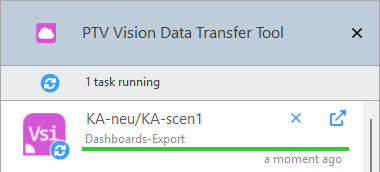
The Uploads and downloads window opens and a green bar shows the progress of the upload process. A hyperlink for the current scenario or model is displayed, which takes you to the corresponding target scenario or model in the PTV Hub web application once the upload is complete.
After the data has been successfully processed, the following window will appear:
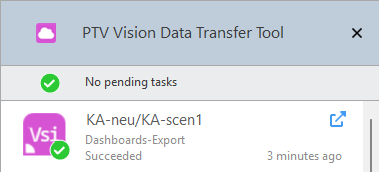
By clicking the hyperlink, the target scenario is displayed in the PTV Hub web application.
Canceling the upload of data
You can cancel the upload and processing of data at the following points:
- In the Uploads and downloads window, click the Cancel button either during the upload or if the upload fails.
- In the Dashboards web application, select the Data tab in the Upload row of the corresponding scenario and click Cancel during the upload.
The upload process in PTV Vision Data Transfer Tool and data processing in PTV Hub are canceled.
Repeating the upload of data
If the upload or processing of the data fails, this will be displayed in the Uploads and downloads window.
- ► Click the Retry button to repeat the process.
Installing PTV Vision Data Transfer Tool throughout the system
The PTV Vision Data Transfer Tool is installed automatically when you use a cloud feature for the first time in one of the products Visum, Vissim or Vistro. In certain cases, it may be necessary to install or update administrator rights for the PTV Vision Data Transfer Tool throughout the system. In this case, you can obtain a special setup.
Please contact Technical Support for assistance:  PTV Group - Support request.