Important: If you are using a version of Optima superior or equal to the version 19.5.96277, you can ignore the next WARNING NOTE.
 WARNING NOTE
INRIX has recently decided to remove the API GetReferenceSchemaInGeography.
This API is not more reachable.
For this reason, if you are using versions of Optima up lower than version 19.5.96277 and you use the INRIX interface, YOU MUST AVOID deleting DB contents (for example, when you planning a successive installation process by scratch).
With an empty DB, Optima would try to contact the old INRIX APIs for a first initialization, and would fail in this attempt. The result is that INRIX interface not working at all.
Locations provided by INRIX (INRIX XD Segments = XDS) are referred to the Optima reference network with the help of OpenLR software. XDS are not provided in the standard OpenLR XML encoding format but in an INRIX specific format.
Example
  <reportSegments>
  <ReportSegmentID>1232187</ReportSegmentID>
  <ReportSegmentLRC>
    <method>
      <olr:version>1.0</olr:version>
      <olr:locationReference>
      <olr:optionLinearLocationReference>
      <olr:first>
        <olr:coordinate>
          <olr:longitude>99964</olr:longitude>
          <olr:latitude>2266472</olr:latitude>
        </olr:coordinate>
        <olr:lineProperties>
          <olr:frc olr:table="olr001_FunctionalRoadClass" olr:code="0"/>
          <olr:fow olr:table="olr002_FormOfWay" olr:code="1"/>
          <olr:bearing>
            <olr:value>151</olr:value>
          </olr:bearing>
        </olr:lineProperties>
        <olr:pathProperties>
          <olr:lfrcnp olr:table="olr001_FunctionalRoadClass" olr:code="0"/>
          <olr:dnp>
            <olr:value>13223</olr:value>
          </olr:dnp>
          <olr:againstDrivingDirection>false</olr:againstDrivingDirection>
        </olr:pathProperties>
      </olr:first>
      <olr:last>
        <olr:coordinate>
          <olr:longitude>-14937</olr:longitude>
          <olr:latitude>-6141</olr:latitude>
        </olr:coordinate>
        <olr:lineProperties>
          <olr:frc olr:table="olr001_FunctionalRoadClass" olr:code="0"/>
          <olr:fow olr:table="olr002_FormOfWay" olr:code="1"/>
          <olr:bearing>
            <olr:value>41</olr:value>
          </olr:bearing>
        </olr:lineProperties>
      </olr:last>
      <olr:positiveOffset>
        <olr:value>1943</olr:value>
      </olr:positiveOffset>
      <olr:negativeOffset>
        <olr:value>9442</olr:value>
      </olr:negativeOffset>
      </olr:optionLinearLocationReference>
      </olr:locationReference>
    </method>
  </ReportSegmentLRC>
  <LinearConnectivity>
    <negLink>
      <ReportSegmentID>1232186</ReportSegmentID>
    </negLink>
    <posLink>
      <ReportSegmentID>1232188</ReportSegmentID>
    </posLink>
  </LinearConnectivity>
  <SegmentNames>
    <Name>L'Aquitaine</Name>
  </SegmentNames>
  <segmentLength>1839</segmentLength>
  <segmentRefSpeed>0</segmentRefSpeed>
</reportSegments>
XDS are provided in an INRIX specific format, therefore is necessary to transform it into the standard OpenLR format.
As you can see in the example, the location reference point (LRP) coordinates are Integer values that have to be transformed in numbers Real (type Real) representing the geographic points in WGS84.
The transformation is performed with the following formula:
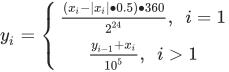
| Parameter | Description |
|---|---|
| xi | Longitude or latitude in the Integer value of the i-th LRP |
| yi | Longitude or latitude in WGS84 of the i-th LRP |
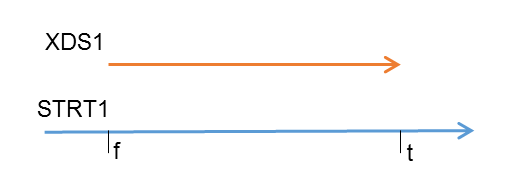
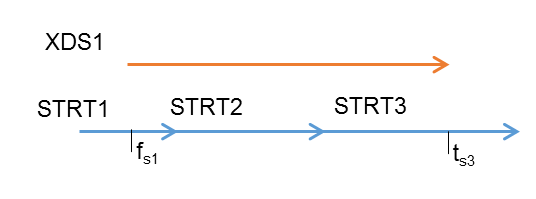
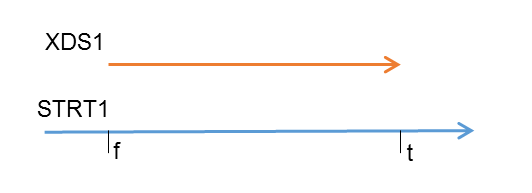
A single XDS can be mapped to one or to many streets as follows:
-
Matching example 1:
XDS1 match on STRT1 from relative position f to relative position t with f ∈ [0 , 1] < t ∈ [0, 1]
-
Matching example 2:
XDS1 match on:
- STRT1 from relative position fs1 to relative position 1
- STRT2 from relative position 0 to relative position 1
- STRT3 from relative position 0 to relative position ts3
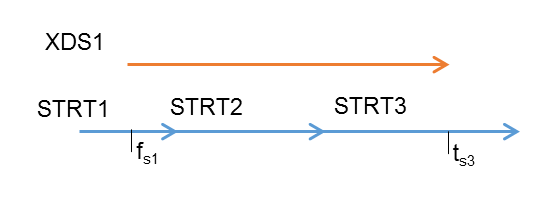
The mapping between the streets and the XDS is produced by the INRIX Interface.
Storage and tables in the Optima database
The mapping is stored in the PLST table of the Optima database (→ External network > Predefined locations to street links – PLST table). In this table, in the case of INRIX:
- PRIL = XDS ID
- SECL = INDX
Note that in the table SECL is a string. So in order to define the correct street sequence for a given PRIL, it is necessary to set this field that has the same number of characters as the maximum INDX value for a given PRIL has digits.
Example
| PRIL | SECL | INDX | STRT | FSND | TYPE | FPRG | TPRG |
|---|---|---|---|---|---|---|---|
| 54321 | ‘001’ | 1 | 4352 | 3751 | ‘inrix’ | 0.8 | 1 |
| 54321 | ‘002’ | 2 | 5322 | 5091 | ‘inrix’ | 0 | 1 |
| … | |||||||
| 54321 | ‘010’ | 10 | 5637 | 6589 | ‘inrix’ | 0 | 1 |
| … | |||||||
| 54321 | ‘120’ | 120 | 9418 | 7941 | ‘inrix’ | 0 | 1 |
| 54321 | ‘121’ | 121 | 9063 | 7577 | ‘inrix’ | 0 | 0.7 |
The INRIX Interface produces two more tables:
- XDS_NODES (→ OpenLR location reference point (LRP) – XDS_NODES table)
- XDS_EDGES (→ OpenLR line location reference – XDS_EDGES table)
Views
To see which streets are mapped by each XDS, the INRIX Interface produces the view xds_streets_v(→ View – XDS_STREETS_V table).
The length and shape of the XDS are computed according to the offset of the OpenLR line location reference (LLR) provided by INRIX. Actually it is not correct to compute the shape of the XDS considering the offset values. This is because, according to the OpenLR documentation, the offset values must be applied only on the sequence of network links mapped to the XDS. However, to analyze the quality of the mapping, considering the offset on the XDS can help to better visually associate an XDS to a set of streets. As the offset values are not referred to the XDS geometry (given by a sequence of location reference points), it can happen that some XDS in this view have no shape and no length due to the incoherent values of offset with respect to the total XDS length. For example, it can happen that pos + nos > tot_xds_length.
For XDS like this, the following view must be considered in order to analyze the mapping to the XDS Optima reference network: xds_streets_original_v (→ View – XDS_STREETS_ORIGINAL_V).
The two views are very useful for checking the precision of the automatic mapping routine. You can import views into some GIS software together with the Optima reference network to visually check whether there are network zones that present mapping issues. In particular, the xds_streets_original_v view must be used if the offset values of an XDS location are not coherent with respect to the XDS coordinates.
These offsets are to be applied to the sequence of streets mapped to the XDS and not to the XDS itself. The xds_streets_v view considers the offset on the XDS for debugging, in order to get an idea about the feasible streets sequence to which the XDS is mapped.
To better understand this point, look at the following example, where an XDS is shown and the streets sequence the mapped it without considering the offset values.
The next image shows the XDS offset values:
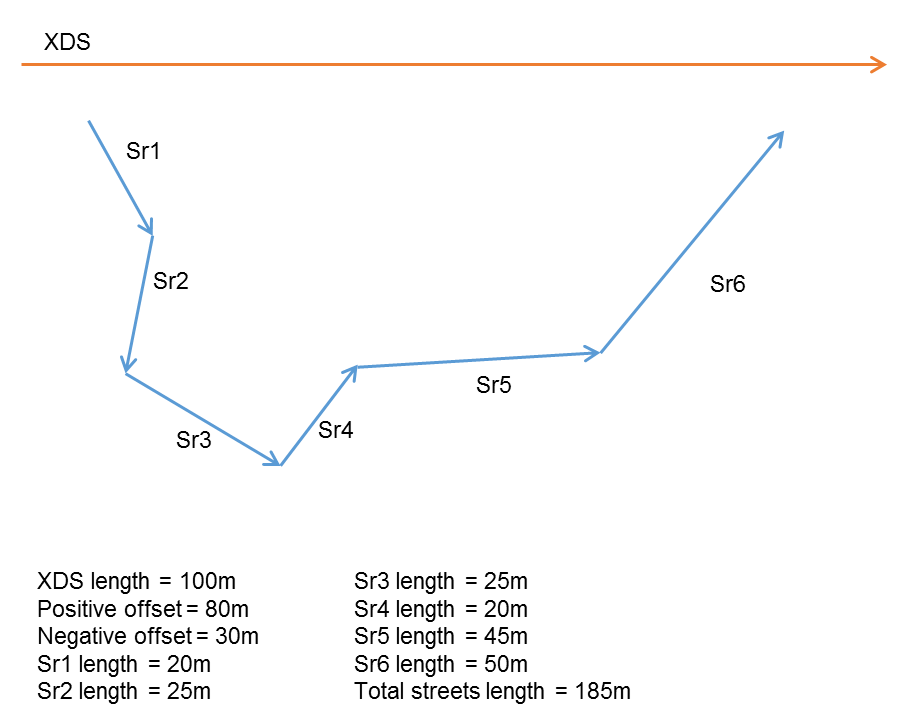
In this case: positive offset + negative offset > XDS length
So this XDS in xds_streets_v has a non-representable shape because the sum of offset values overcomes the XDS length. These offset values are used to specify that this line location reference (LLR) has to be mapped only to streets S4 and S5 (with a specific relative position on them) but not to the entire street sequence from S1 to S6.
Manual mapping adjustment
In order to manually modify the INRIX mapping, you need to run queries to change the related DB tables. To see how good the mapping is, you need to imported the output into some GIS software. We recommend using the free software QGIS (http://www.qgis.org).
The layers to import into the GIS are:
- SNOD table (use the provided style snod.sld)
- STRT table (use the provided style strt.sld)
- xds_nodes (use the provided style xds_nodes.sld)
- plst_shap_v view that underlines the mapped streets (use the provided style plst_shap_v.sld). To create the view, use the provided sql plst_shap_v.sql.
- plst_opp_shap_v view that includes the not mapped streets (use the provided style plst_opp_shap_v.sld). To create the view, use the provided sql plst_opp_shap_v.sql.
- xds_streets_v view of the XD segment including information about mapped streets (use the provided style xds_streets_v.sld) with length and shape defined according to the offset values. This view should have been created by the INRIX Interface. If this view does not exist, use the provided sql xds_streets_v.sql to create the view.
- xds_streets_original_v view of the XD segment including information about mapped streets (use the provided style xds_streets_original_v.sld) with the original length and shape (without considering the offset values). This view should have been created by the INRIX Interface. If this view does not exist, use the provided sql xds_streets_original_v.sql to create the view.
Manually removing a wrong mapping
It may happen that the OpenLR decoding procedure wrongly associates an XDS to some streets.
The next image shows an example of a wrong OpenLR decoding result where the XDS with ID = 1502214 has been mapped to the street with idno = 3140 and tail = 2635.
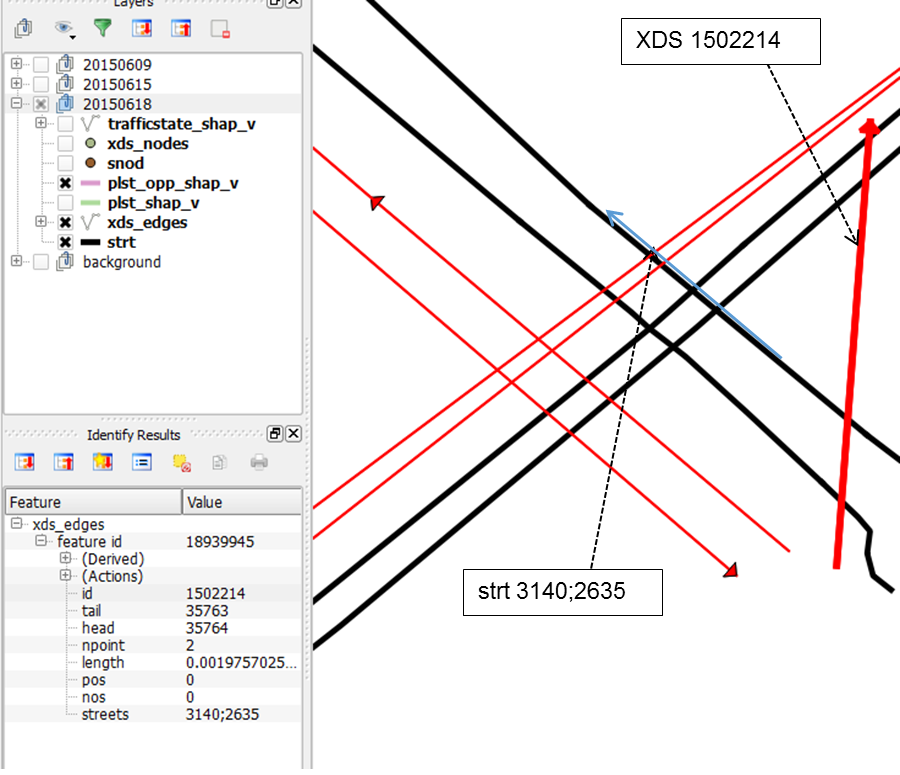
To remove this wrong relation, use the following query:
delete from plst where type=’inrix’ AND pril='1503878';
This query removes from the PLST table the row related to the wrong mapping information.
Manually adding or updating a mapping relation
The mapping might present some holes (streets that are not mapped to any XDS). In this case, you should run a deep analysis on the specific case in order to resolve these uncovered regions.
Example:
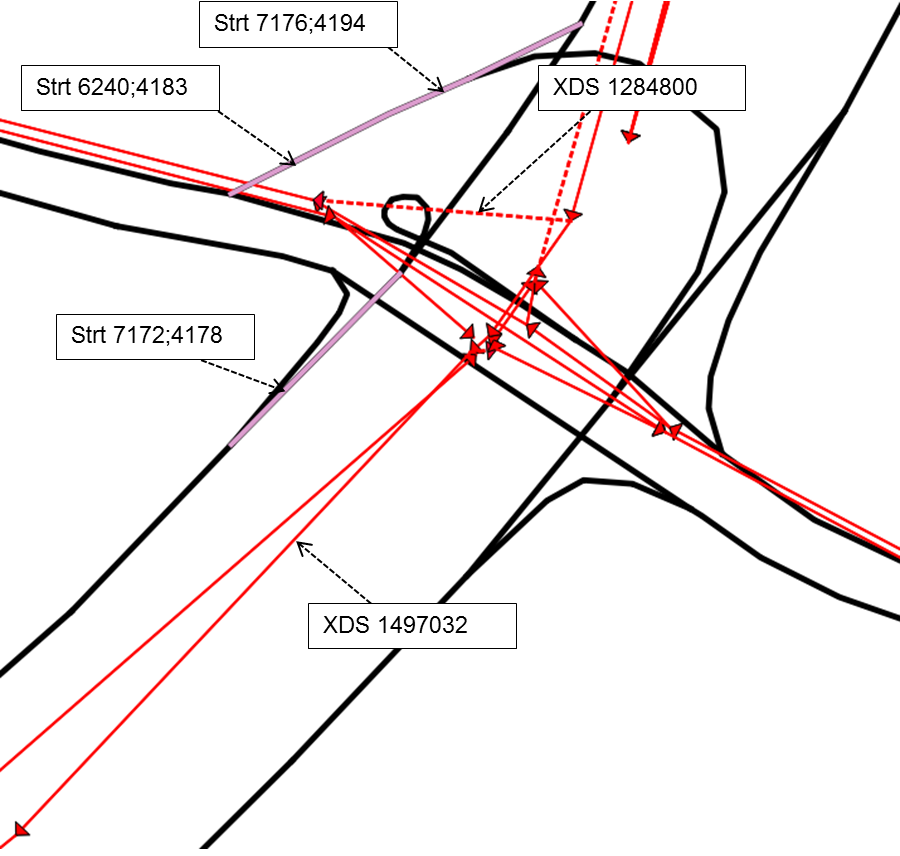
The following streets (purple) have not been mapped:
- S1: 7176;4194
- S2: 6240;4183
- S3: 7172;4178
S1 and S2 could be mapped to the XDS 1284800 = XDS1.
S3 could be mapped to XDS 1497032.
While XDS1 has not been mapped, XDS2 is already associated to three streets: 6244;4174,7174;4169,7186;4161.
To manually add the mapping information for S1 and S2, you can use the followings query:
insert into plst (secl,pril,type,strt,fsnd,indx) values ('1',' 1284800','inrix',7176,4194,1), ('2',' 1284800','inrix',6240,4183,2);
To update the mapping information related to the XDS2 in order to add S1, you can use the following query:
insert into plst (secl,pril,type,strt,fsnd,indx) values ('4',' 1497032','inrix',7172,4178,4);
Note that in this case the secl and indx fields are set to 4 because the XDS has already been mapped to three streets. In the second query the field streets is updated concatenating the new street identification tag on the existing streets value.
Mapping initialization
When Optima starts, the INRIX interface asks for the last map version of the XD Segments provided by INRIX, using the API:
https://gateway-api.inrix.com/v1/mapversion/?accesstoken={{UAStoken}}.If the PROVIDER_MAP_INFO table already contains information about the INRIX map version,and PROVIDER_MAP_INFO.LOC_IMPORTED=true, and the available INRIX map version is newer than the one currently used in Optima:
- A log error is registered in: /opt/ptv-optima-vv.n.xxxxptv-optima-as/standalone/log/optima-dataInterface.log file
- An email containing the log error is sent (→ Sending map version information by e-mail).
Log error example
ERROR [com.sistemaits.optima.adi.providers.inrix.map_version.MapVersionManager] (ServerService Thread Pool -- 79)
A new INRIX MapVersion is available: 20.2! Current INRIX MapVersion is: 20.1.
If the PROVIDER_MAP_INFO table already contains information about the INRIX map version but PROVIDER_MAP_INFO.LOC_IMPORTED=false, the value of map version is updated with the last retrieved by API.
The map version stored in PROVIDER_MAP_INFO is used in the APIs for downloading the INRIX locations (Data Download Service).
Once the INRIX locations are loaded and properly mapped:
- They are stored in the DB and PROVIDER_MAP_INFO.LOC_IMPORTED=true.
-
The map version is checked every Monday at 10 a.m., and if the current INRIX map version is newer than the one currently used in Optima:
- A log error is registered in: /opt/ptv-optima-vv.n.xxxxptv-optima-as/standalone/log/optima-dataInterface.log file.
- An email containing the log error is sent (→ Sending map version information by e-mail).
Mapping workflow
The mapping workflow is based on different criteria:
-
If loadLocationsFromDbIfTableExists=true, the process tries to load the mapping from the DB.
If mapping is successfully loaded from the DB, the process is completed (steps from 2 to 3 are skipped).
-
If (((the DB query run at step 1 returns an empty result) AND (PROVIDER_MAP_INFO.LOC_IMPORTED=false)) OR loadLocationsFromDbIfTableExists=false) is true:
- Check the parameter segmentXdsFile.
- If segmentXdsFile is set, INRIX XDS are loaded (and mapped) from the file specified in segmentXdsFile.
- If the specified file doesn't exist, the INRIX data are not loaded.
-
If segmentXdsFile is not set, the INRIX XDS are loaded (and mapped) from the INRIX API (Data Download Service).
Important: Step d is made only if you are using a version of Optima superior or equal to the version 19.5.96277.
Mapping can be load from segmentXdsFile element (step b) or via API (step d)
-
If ((PROVIDER_MAP_INFO.LOC_IMPORTED=true) AND (the DB query run at step 1 returns an empty result, thus PLST table is empty)), a misleading condition is trapped and an error on INRIX interface management is registered in the log file:
/opt/ptv-optima-vv.n.xxxxptv-optima-as/standalone/log/optima-dataInterface.log.
Once the INRIX location are loaded (from the specified file or through the INRIX API) and properly mapped, they are stored in the DB and PROVIDER_MAP_INFO.LOC_IMPORTED=true (for a version of Optima superior or equal to the version 19.5.96277).
The INRIX mapping initialization is cached in memory forever (until Optima AS is stopped).
Important: This information only changes when the underlying map data changes (infrequently event). The API only needs to be called when the data changes, usually once per map update. Contact your INRIX account representative to understand when this change happens.
Refreshing INRIX mapping
To refresh the INRIX mapping, proceed as listed:
- Stop Optima AS
-
Delete the DB tables used to store the INRIX mapping (see → INRIX), as listed:
- XDS_NODES
- XDS_EDGES
- XDS_NODES_EDGES
-
Important: Step 3 must be run only if you are using a version of Optima superior or equal to the version 19.5.96277.
Set:
PROVIDER_MAP_INFO.LOC_IMPORTED=false
- Start Optima AS.
Sending map version information by e-mail
You can configure the AS to send an e-mail informing you about the map version changes.
According with the specific type of installation, see:
→ Installing Optima on Windows server > Step 4: Configuring SMTP alerts
→ Installing Optima on Linux server > Step 3: Configuring SMTP alerts
→ Installing Optima on three servers > Step 3: Configuring SMTP alerts
Add the handler element with name="emailHandler" in the logger element:
<logger category="com.sistemaits.optima.adi.providers.inrix.map_version.MapVersionManager">
    <level name="INFO"/>
    <handlers>
        <handler name="OptimaDatexInterface"/>
        <handler name="web-datex"/>
	<handler name="emailHandler"/>
     </handlers>
</logger>