The output of the Harmonizer module can be re-directed to multiple destinations (see → <Destinations> node).
To handle the communication with MLF, is necessary to write on Kafka, setting properly the XML node <destination> into:
/opt/ptv-optima-vv.n.xxxxptv-optima-as/standalone/configuration/optima/optima-configuration.xml.
 Kafka topics
For this option, into <destination> node you can specify how the Harmonizer writes:
-
Inside a topic named outputTopicName, with type set to KAFKA. The names of Kafka topics can be created:
-
At installation time.
-
Automatically created by Kafka, according with the first attempt to send a message. The automatic creation needs a specific configuration of the broker, setting the property auto.create.topics.enable=true in conf/server.properties file. The topic is created with characteristics defined in conf/server.properties file.
-
-
In a specific Kafka broker installed on IP address and PORT specified in bootstrapAddress.
-
Data that must have the timestamp expressed in LocalDateTime, referred to the zoneId timezone. The possible values for zoneId are referred to the list of zones contained here.
Example
<destination>
    <type>KAFKA</type>
    <bootstrapAddress>192.168.50.85:9092</bootstrapAddress>
    <outputTopicName>sf-harmonizerdata_${env:ENVIRONMENTID}</outputTopicName>
    <zoneId>Europe/Paris</zoneId>
</destination>
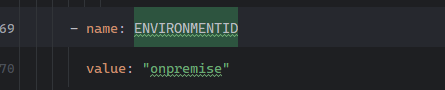
ENVIRONMENTID is an environment variable that usually, for Optima on-premise installations, is set to onpremise.
Anyhow it must be set with the same value set for the environment variable set in deployment.yaml files, for all the MLF microservices (see → MLF configuration parameters).